What is inside
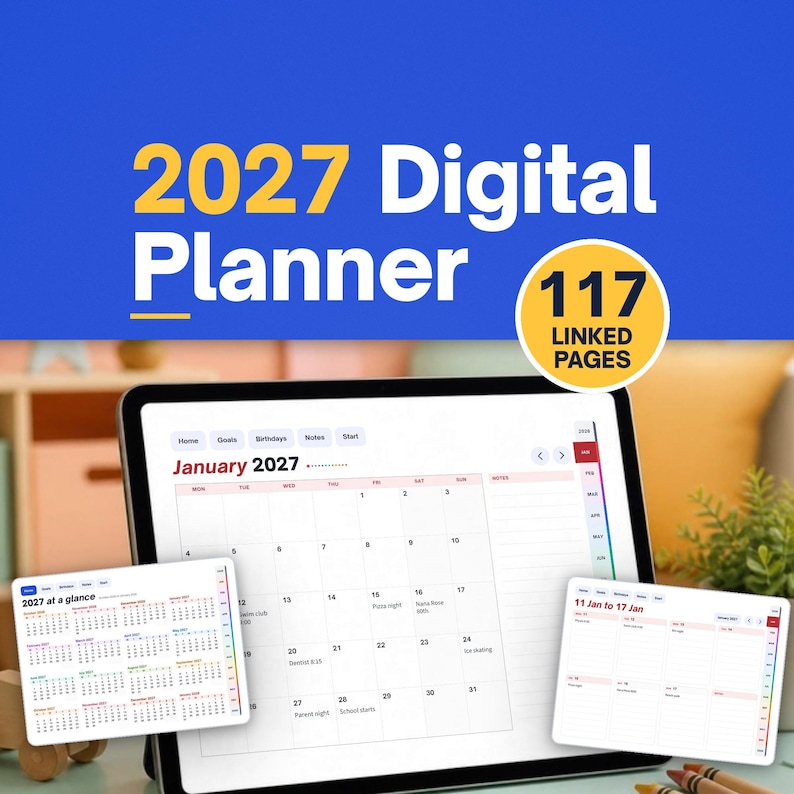
The planner runs for 16 months, from October 2026 to January 2028, with 71 weekly spreads. Beyond the calendar pages there is a year at a glance, a 2027 goals page with six goal boxes, a birthdays and dates page by month and 24 note pages.
Every page carries the same navigation. Buttons for Home, Goals, Birthdays, Notes and Start sit across the top, a coloured strip of month tabs runs down the right edge, and arrows step to the next or previous month. Tap any day on a month page to open its week.
Four PDFs are in the download: landscape and portrait, each with a Monday or Sunday week start. Open one in a PDF annotation app on your tablet and write straight onto the pages. A further zip holds a start here guide plus print, type and Word editions for A4 and Letter paper.
Questions
- What dates does the 2027 digital planner cover?
- It covers 16 months, from October 2026 through January 2028, with a month page for each and 71 weekly pages, so you can start planning before the new year.
- How do the links in the planner work?
- Top buttons go to Home, Goals, Birthdays, Notes and Start, month tabs on the right jump to any month, and tapping a day on a month page opens that week.
- Can I print the planner or edit it in Word?
- Yes. Alongside the four tablet PDFs, a zip includes print and type editions for A4 and Letter and a Word edition, with a start here guide explaining which to use.