Skip to content

    PrintablesUnlocks with one sponsored offer (an ad; we earn a commission) or your email.

    Craft fair tracker spreadsheet for stall takings and cash float

    A market day workbook for Excel and Google Sheets with eight sheets for stock, takings, cash counts and season totals, built for craft fair and market stall sellers tracking up to 60 days.

    • 3 files (ZIP, PDF)

    Download

    Free preview · Unlock the file

    1. Choose offer
    2. Complete it
    3. Download

    Unlock it with one sponsored offer; we earn a commission. Offers are for ages 18+.

    Offers open in a new tab. Your download starts here once the partner confirms, usually within a minute or two. No account needed.
    What is inside

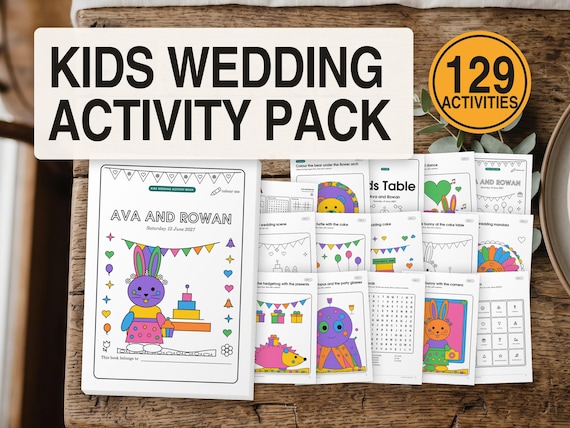
    The workbook has eight tabs: Start, Settings, Stock, Markets, Tally, Cash Count, Season and Day Sheet. Markets takes one row per market day, where you type the stall fee, costs and card takings, and it works out expected takings, the difference and a cash check that reads Short, Balanced or Over.

    Cash Count lists notes and coins from 100 down to 0.05. You type how many of each you hold at the start and at close, and the sheet totals the float for both rows. Season pulls the days together with a chart, and Day Sheet gives a page to print for the stall.

    Two copies sit in the zip, one filled in with a fictional sample stall so you can see the sums working, and one blank to start from. Start guides in A4 and US Letter walk through setup before your first market.

    Good for

    • Craft fair and makers market sellers
    • Checking the cash tin balances
    • Seeing profit across a market season
    • Weekend stallholders new to spreadsheets

    Questions

    Does the market stall tracker work in Google Sheets?
    Yes. The title lists Excel and Google Sheets, and the eight tabs, totals and cash check columns are the same in both. Open the workbook from the zip in whichever one you use.
    How does the cash check know if my tin is short?
    Cash taken plus card takings should equal what you sold. The Markets sheet compares that with expected takings and marks the day Short, Balanced or Over, with the difference beside it.
    Is there an example to follow before I start?
    The download has a filled sample copy based on a fictional stall alongside a blank copy, so you can see each sheet with numbers in it before typing your own.